


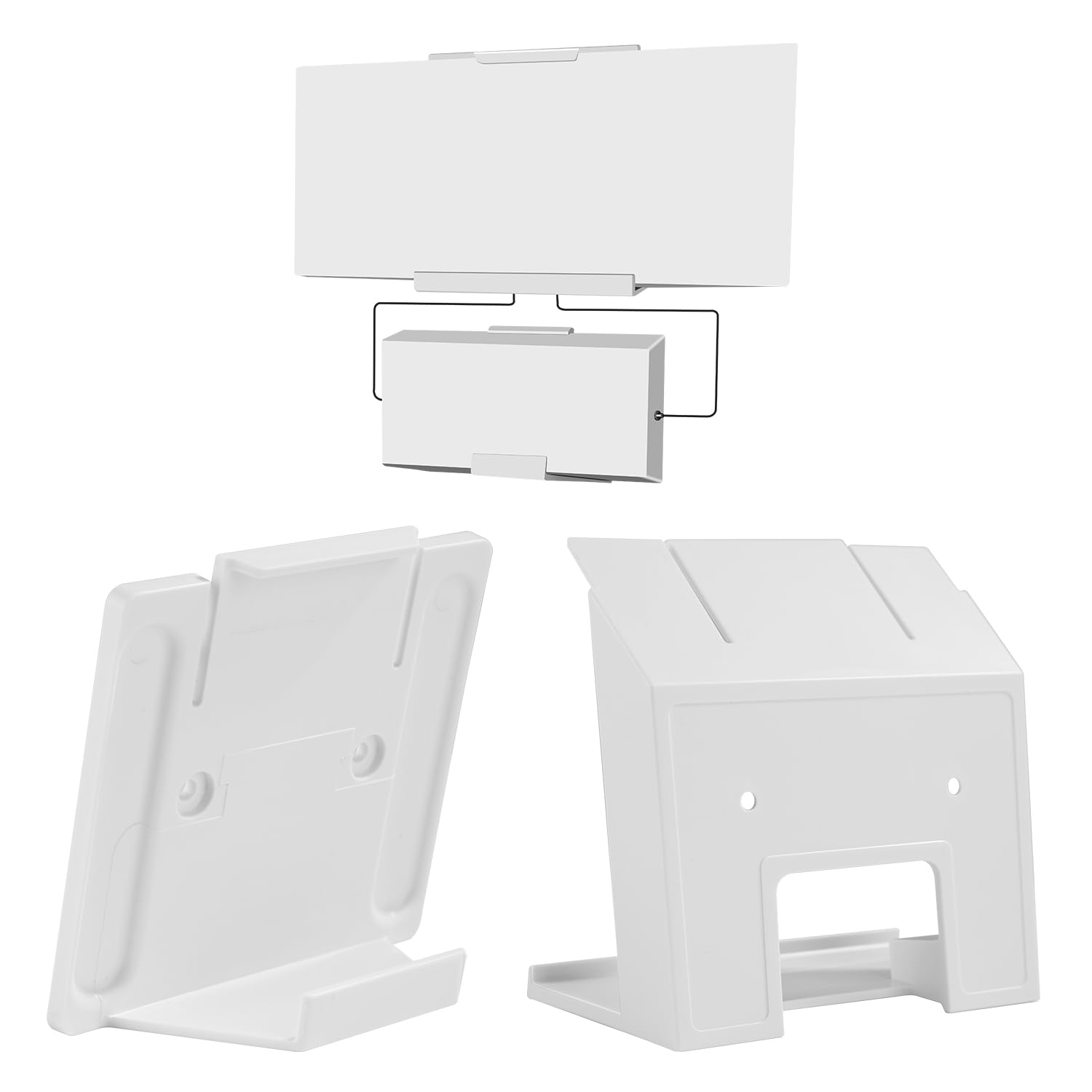
Starlink Gen 3 Router Mount in Kenya – Space-Saving Wall Mount for Starlink Wi-Fi 6 Router

The Starlink Gen 3 Router Mount is a dedicated mounting accessory designed to securely attach the Starlink Gen 3 Router directly onto:
-
Walls
-
Wooden surfaces
-
Office panels
-
Cabinets
-
Network rooms
-
RV interiors
-
Mobile workstations
-
Utility rooms
-
Structured networking areas
The mount helps users create a:
-
Cleaner Starlink installation
-
More organized cable layout
-
Space-saving networking setup
-
Professional-looking deployment
-
Safer router placement
According to Starlink’s official Router Mount installation guide, the:
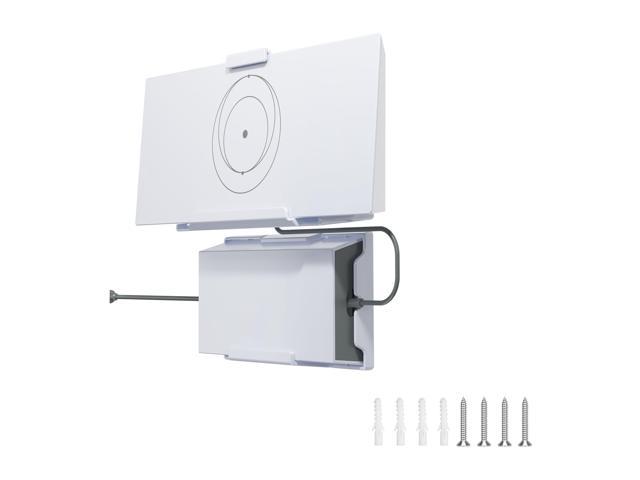
“GEN 3 ROUTER MOUNT KIT” is designed specifically for the Gen 3 router and includes installation instructions and mounting hardware.
A Starlink Gen 3 Router Mount product description further explains:
“The Router Mount is designed to mount the Gen 3 Router directly to a wall or other surface.”
The mount is ideal when:
-
Desk space is limited
-
Clean networking layouts are needed
-
Router protection is important
-
Cable organization matters
-
Wi-Fi placement optimization is required
-
Mobile installations need secure equipment mounting
As Starlink adoption grows across Kenya, the Gen 3 Router Mount is becoming increasingly useful for:
-
Homes
-
Offices
-
Schools
-
Lodges
-
Hotels
-
Apartments
-
RVs
-
Mobile offices
-
Smart homes
-
Professional networking setups
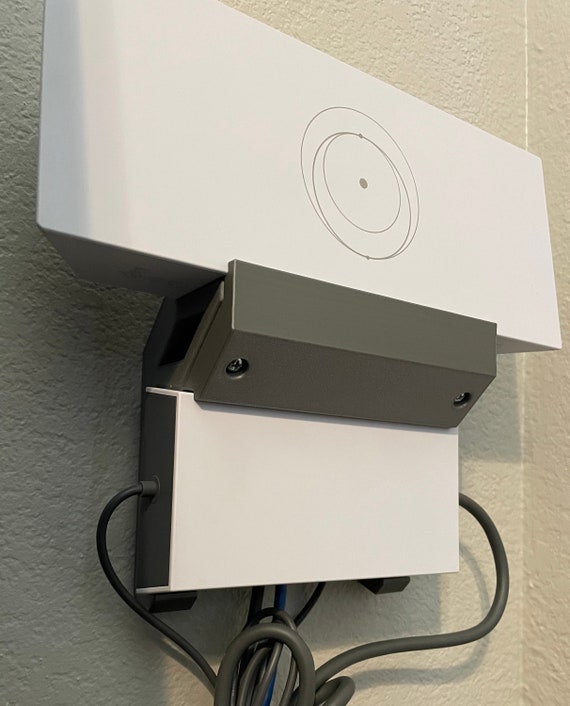
Starlink Gen 3 Router Mount Image & Installation Example

Why the Starlink Gen 3 Router Mount Is Important
Cleaner & More Professional Starlink Installations
The Gen 3 Router Mount helps organize the Starlink networking system while protecting the router and reducing clutter.
| Feature | Benefit |
|---|---|
| Wall mounting support | Saves desk and floor space |
| Secure router attachment | Prevents accidental falls |
| Cable retention system | Cleaner cable management |
| Organized networking | Better installation appearance |
| Professional deployment | Better office and home setups |
| Elevated placement | Better Wi-Fi positioning |
| Compact mounting design | Cleaner networking environment |
| Surface mounting capability | Flexible installation |
| Router protection | Reduced accidental movement |
| Mobility installation support | Better RV and mobile deployments |
| Snap-in mounting system | Easier router installation |
| Cleaner workstation setup | Reduced clutter |
Starlink product information explains that:
-
The router snaps securely into the mount
-
Cable retention prevents accidental cable removal
Complete Starlink Gen 3 Router Mount Specifications
Detailed Technical Specifications Table
| Specification Category | Details |
|---|---|
| Product Name | Starlink Gen 3 Router Mount |
| Compatible Router | Starlink Gen 3 Router / Router 3 |
| Main Purpose | Wall/surface router mounting |
| Mounting Type | Wall or vertical surface |
| Best Applications | Homes, offices, RVs, utility rooms |
| Cable Management | Integrated cable retention |
| Installation Style | Permanent or semi-permanent |
| Router Placement | Vertical wall positioning |
| Space Saving | Excellent |
| Outdoor Use | Indoor recommended |
| Mobility Support | Yes |
| Installation Difficulty | Low to moderate |
| Package Dimensions | 250 × 165 × 85 mm |
| Package Weight | 0.34 kg |
| Recommended Tools | Drill, marker, screwdriver |
Official installation and product documentation confirm:
-
Package dimensions of 250 × 165 × 85 mm
-
Package weight of 0.34 kg
-
Surface mounting support
Detailed Router Compatibility Table
Supported Starlink Systems
| Starlink System | Compatibility |
|---|---|
| Starlink Standard Gen 3 | Excellent |
| Starlink Standard 4X | Excellent |
| Starlink Version 4 Kit | Excellent |
| Gen 3 Mesh Router | Excellent |
| Gen 2 Router | Not designed for it |
| Starlink Mini Router | Not intended |
| Third-Party Routers | No |
The mount is specifically designed for:
-
Starlink Gen 3 Router / Router 3
Detailed Build Quality & Construction Table
Router Mount Durability Analysis

| Construction Feature | Benefit |
|---|---|
| Compact wall bracket | Cleaner installation |
| Snap-in router support | Easier setup |
| Cable retention system | Better cable safety |
| Durable structure | Better long-term stability |
| Lightweight architecture | Easier installation |
| Surface mounting support | Flexible deployment |
| Wall-safe design | Cleaner mounting |
| Organized cable exits | Better networking layout |
| Secure router grip | Reduced accidental movement |
| Minimalist design | Better aesthetics |
Third-party mount manufacturers commonly describe Gen 3 Router Mounts as:
-
Durable
-
Space-saving
-
Organized networking accessories
Router Mount vs Desk Placement
Detailed Placement Comparison Table
| Feature | Router Mount | Desk Placement |
|---|---|---|
| Space Saving | Excellent | Poor |
| Cable Organization | Excellent | Moderate |
| Professional Appearance | Excellent | Moderate |
| Router Safety | Better | Moderate |
| Clutter Reduction | Excellent | Poor |
| Wi-Fi Positioning | Better | Moderate |
| Office Suitability | Excellent | Moderate |
| Mobility Installations | Excellent | Poor |
| Cleaning Convenience | Better | Moderate |
| Wall Utilization | Excellent | None |
The Gen 3 Router Mount provides a cleaner and more organized networking setup compared to simply placing the router on a desk or shelf.
Detailed Cable Management Table
How the Router Mount Improves Cable Organization
| Cable Management Feature | Benefit |
|---|---|
| Cable retention system | Prevents accidental unplugging |
| Elevated routing | Cleaner cable layout |
| Structured networking support | Better organization |
| Reduced floor clutter | Safer workspace |
| Wall routing compatibility | Cleaner installations |
| Better power cable management | Improved appearance |
| Organized Ethernet routing | Better networking setup |
| Reduced cable tension | Better connector protection |
Starlink documentation states that:
-
Cable retention helps prevent accidental cable disconnection
Detailed Installation Requirements Table
Tools & Setup Requirements
| Requirement | Purpose |
|---|---|
| Drill | Mounting hole preparation |
| Marker | Position alignment |
| Screwdriver | Secure attachment |
| Wall anchors | Stronger wall support |
| Flat wall surface | Better stability |
| Cable routing plan | Cleaner installation |
| Router positioning plan | Better Wi-Fi coverage |
The official installation guide lists:
-
Drill
-
Marker
-
Screwdriver
-
Drill bits as recommended tools
Best Applications for the Gen 3 Router Mount in Kenya
Use Case Table
| Use Case | Benefit |
|---|---|
| Homes | Cleaner Wi-Fi setup |
| Offices | Professional networking layout |
| Apartments | Better space utilization |
| RVs | Secure mobile networking |
| Lodges | Organized guest Wi-Fi |
| Schools | Structured networking |
| Utility Rooms | Cleaner equipment placement |
| Smart Homes | Better cable management |
| Mobile Offices | Reduced movement during travel |
| Retail Shops | Cleaner customer-facing setup |
Official Router Mount vs Third-Party Router Mounts
Detailed Comparison Table
| Feature | Official Router Mount | Third-Party Mount |
|---|---|---|
| Official compatibility | Excellent | Varies |
| Snap-in fitment | Excellent | Mixed |
| Cable retention | Excellent | Varies |
| Installation quality | Excellent | Mixed |
| Material quality | Excellent | Varies |
| Design precision | Excellent | Mixed |
| Price | Higher | Often lower |
| Specialized options | Moderate | Wider variety |
Official Router Mounts provide the best guaranteed fit and compatibility, while premium third-party mounts may offer additional design variations.
Common Installation Problems & Solutions
| Problem | Cause | Solution |
|---|---|---|
| Router feels loose | Improper mounting | Tighten mounting hardware |
| Poor Wi-Fi coverage | Bad placement | Reposition higher or centrally |
| Cable tension | Poor routing | Add service loops |
| Wall damage | Weak anchors | Use proper anchors |
| Router overheating | Poor ventilation | Maintain airflow |
| Cable clutter | Poor planning | Use clips and organized routing |
| Weak mount stability | Incorrect surface | Use stronger wall surface |
Why Buy from Starlink Nairobi Installers
Purchasing your Starlink Gen 3 Router Mount from Starlink Nairobi Installers provides:
| Service | Benefit |
|---|---|
| Genuine Starlink-compatible accessories | Better compatibility |
| Professional router mounting | Cleaner installations |
| Wi-Fi optimization support | Better coverage |
| Cable routing assistance | Better organization |
| Office networking support | Improved productivity |
| Smart home deployment | Better structured networking |
| Technical troubleshooting | Faster issue resolution |
| Nationwide Kenya support | Kenya-wide installation assistance |
Frequently Asked Questions (FAQs)
1. What is the Starlink Gen 3 Router Mount?
It is a wall/surface mounting accessory designed for the Starlink Gen 3 Router.
2. What does the Router Mount help with?
It improves:
-
Cable organization
-
Space saving
-
Router safety
-
Professional installation appearance.
3. Which router is compatible with this mount?
It is specifically designed for the Starlink Gen 3 Router / Router 3.
4. Can the mount be installed in offices?
Yes. It is excellent for office networking environments.
5. Does the mount help improve Wi-Fi coverage?
Indirectly yes, because better router placement can improve coverage.
6. Is the Router Mount useful for RVs?
Yes. It is ideal for mobility and mobile-office installations.
7. Does the mount include cable management?
Yes. It includes cable retention support.
8. What tools are needed for installation?
Recommended tools include:
-
Drill
-
Marker
-
Screwdriver
-
Drill bits.
9. Can I use this mount outdoors?
It is mainly intended for indoor or protected environments.
10. Is the Router Mount difficult to install?
No. Installation is relatively simple for most users.
11. Can third-party mounts work?
Yes, but official mounts generally provide better compatibility and fit.
12. Can Starlink Nairobi Installers help install it?
Yes. They provide professional Starlink router mounting and networking support across Kenya.
Starlink Gen 3 Router Mount Video Review & Installation Guide

Watch the Full Video Here:
Starlink Gen 3 Router Mount Video Review
The Starlink Gen 3 Router Mount is one of the most useful networking accessories for users who want a cleaner and more organized Starlink installation. Instead of placing the router on a desk, floor, or shelf where cables can become messy and accidental movement can occur, the Router Mount secures the device directly onto a wall or vertical surface. This creates a more professional networking layout and improves overall installation appearance.
One of the biggest advantages of the Router Mount is space efficiency. Homes, offices, RVs, utility rooms, lodges, and structured networking environments often have limited space available for networking equipment. By mounting the Gen 3 Router vertically, users can free up desk space, simplify cable routing, reduce clutter, and create safer equipment layouts. The integrated cable retention system also helps prevent accidental unplugging and improves long-term cable organization.
The video demonstrates installation procedures, wall mounting methods, router positioning, cable organization techniques, and deployment examples for the Starlink Gen 3 Router Mount. It also highlights how organized networking setups improve aesthetics, equipment safety, and operational convenience. Combined with professional support from Starlink Nairobi Installers, users can achieve cleaner, safer, and more reliable Starlink networking installations anywhere in Kenya.
The Starlink Gen 3 Router Mount is an essential accessory for users who want cleaner, safer, and more professional Starlink networking installations. With its wall-mounting capability, cable retention system, space-saving architecture, and secure router positioning, the Router Mount helps improve organization, reduce clutter, and optimize router placement for homes, offices, apartments, RVs, lodges, and business networking environments.
As Starlink adoption continues growing across Kenya, organized networking and professional installation practices are becoming increasingly important. Proper router mounting improves cable management, protects equipment from accidental movement, enhances installation appearance, and supports cleaner Wi-Fi deployment across residential and commercial environments.
For genuine Starlink Gen 3 Router Mounts, professional router installation, cable organization, Wi-Fi optimization, office networking support, and complete Starlink setup services, purchase directly from Starlink Nairobi Installers and enjoy reliable and professionally organized satellite internet connectivity anywhere in Kenya.